
Locate a person by their email address
ghunt.sh estimates the probable city or neighborhood someone lives in or operates from, by clustering the GPS coordinates carried by their public Google Maps reviews and photos. Visual heatmap, confidence score, no signup required.

What "locating a person by email" really means
When people search for ways to find someone's location from an email, two misconceptions come up. The first, geolocating the email itself, is a myth. An email address carries no location data. The IP visible in a message header can sometimes pin down the sending server, but that is the server, not the person. The second, what ghunt.sh actually does, is to derive a probable life area from the public activity attached to the Google account behind that email.
How GHunt estimates a probable area
If the target has a Google account, and that account has left public reviews or photos on Google Maps, every one of those contributions carries GPS coordinates. ghunt.sh pulls every public contribution attached to the email, weights each point by recency and place type, runs density clustering to isolate the dominant area, and treats isolated travel contributions as outliers.
The report shows a heatmap of the contributions, a confidence rectangle around the dominant cluster, and a center marker for the most probable zone the person lives in or operates from.
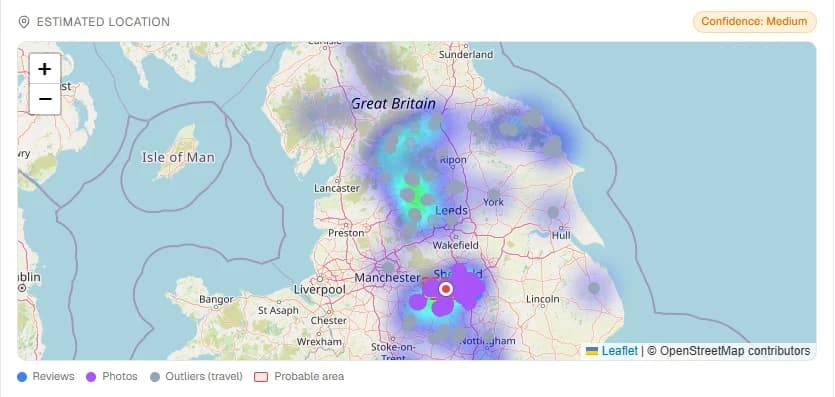
What the report shows
- A heatmap of where the public Maps contributions are densest.
- A probable area drawn as a confidence rectangle.
- A center marker for the estimated focal point.
- Per-point detail: review or photo, name of the place, flagged as an outlier when the contribution sits outside the main cluster.
- A confidence score (high, medium, low) based on how tightly the contributions cluster.
When it works, and when it does not
The estimate is only as good as the public footprint the target has chosen to leave. Three failure modes are worth flagging up front.
If the account has no public Maps contributions, the report says so. There is nothing to estimate. No contributions, no map, no fake guess.
If the target travels often and posts reviews from each trip, the cluster spreads and the confidence score drops. A digital nomad with reviews on three continents will show low confidence rather than a false certainty.
If the contributions are all in one neighborhood, the estimate is tight and the confidence is high. That is the case where the feature shines.
How to run it
- Open ghunt.sh in any browser.
- Paste a Google email into the search box.
- Read the consolidated report. The estimated location map appears alongside the Maps reviews and photos sections, with the confidence score in the corner.
Frequently asked questions
Can you really find someone’s location from their email?
Partially. You cannot extract a location from the email address itself. What ghunt.sh does is derive a probable area from the public Google Maps activity attached to the Google account behind the email. If that account has posted public reviews or photos, those contributions carry GPS coordinates, and the dominant cluster gives you a credible city or neighborhood lead.
How accurate is the estimate?
It depends entirely on how the target uses Google Maps. A heavy public reviewer who only posts in their hometown gives a tight, high-confidence estimate. A casual user with two reviews on two continents gives a loose, low-confidence one. The report shows the confidence level explicitly so you do not over-read the data.
Does this work for any email address?
It works for emails tied to a Google account that has public Maps contributions. For accounts with no public footprint, the report returns nothing rather than a fake guess. That is by design.
Is this a confirmed home address?
No. No public OSINT method can return a confirmed address. The estimate is the geographic centroid of a person’s public Google Maps activity. Treat it as an investigative lead, not as ground truth.
Is it legal to do this?
ghunt.sh only queries public Google endpoints. Every piece of data shown is data the account owner has chosen to make public through their own Google privacy settings. Use it within the laws, rules and engagement scope that apply to your jurisdiction and your work.